Climaty AI - onboarding

One onboarding flow, three ways to get started

One onboarding flow, three ways to get started

A solo brand and a global holding group don’t sign up the same way. Different scale, different structure, different level of trust needed before day one. Forcing both through one flow means one of them loses.

My Role

Product Designer

Team

Product Manager

Engineering

Timeline

Mar 2026 – May 2026

TOOLS

Figma & Claude

Project & Business Context

Project & Business Context

Climaty AI is a workspace for media planners. It pulls ad data from Meta, Google, TikTok, and Snapchat into one chat window, so planners can plan and optimize without switching tools.

Users

Three customer types on one platform:

• Advertiser – a brand running its own campaigns

• Agency – manages many advertisers at once
• Holding Group – manages many agencies, enterprise scale

MY ROLE

Product Designer. I took the PRD's org hierarchy and RBAC (Role-Based Access Control) requirements and turned them into the actual onboarding flows, screen by screen, working alongside the founders and engineering.

The Problem

The Problem

One signup form can’t serve a small brand and a global holding group equally well.

problem statement

An advertiser just needs to connect a few ad accounts and start. An agency needs client hierarchy from day one. A holding group needs a sales call, not a form. Treating all three the same overwhelms small users and under-serves big ones.

proof

Look at how each level actually works: an Advertiser owns Brands, an Agency owns multiple Advertisers, a Holding Group owns multiple Agencies. Three genuinely different structures, not one shape forced to fit all three.

Research (Stakeholders / End User)

Research (Stakeholders / End User)

Through founder introductions, I talked directly with media buyers, strategists, and campaign managers. Setup needs changed by org size. Solo teams wanted speed. Agencies wanted structure. Enterprise buyers wanted a real conversation first.

what they said

  • Solo teams wanted to start fast, no extra setup they didn’t need

  • Agencies wanted client structure built in from day one

  • Enterprise buyers expected a sales call, not a form
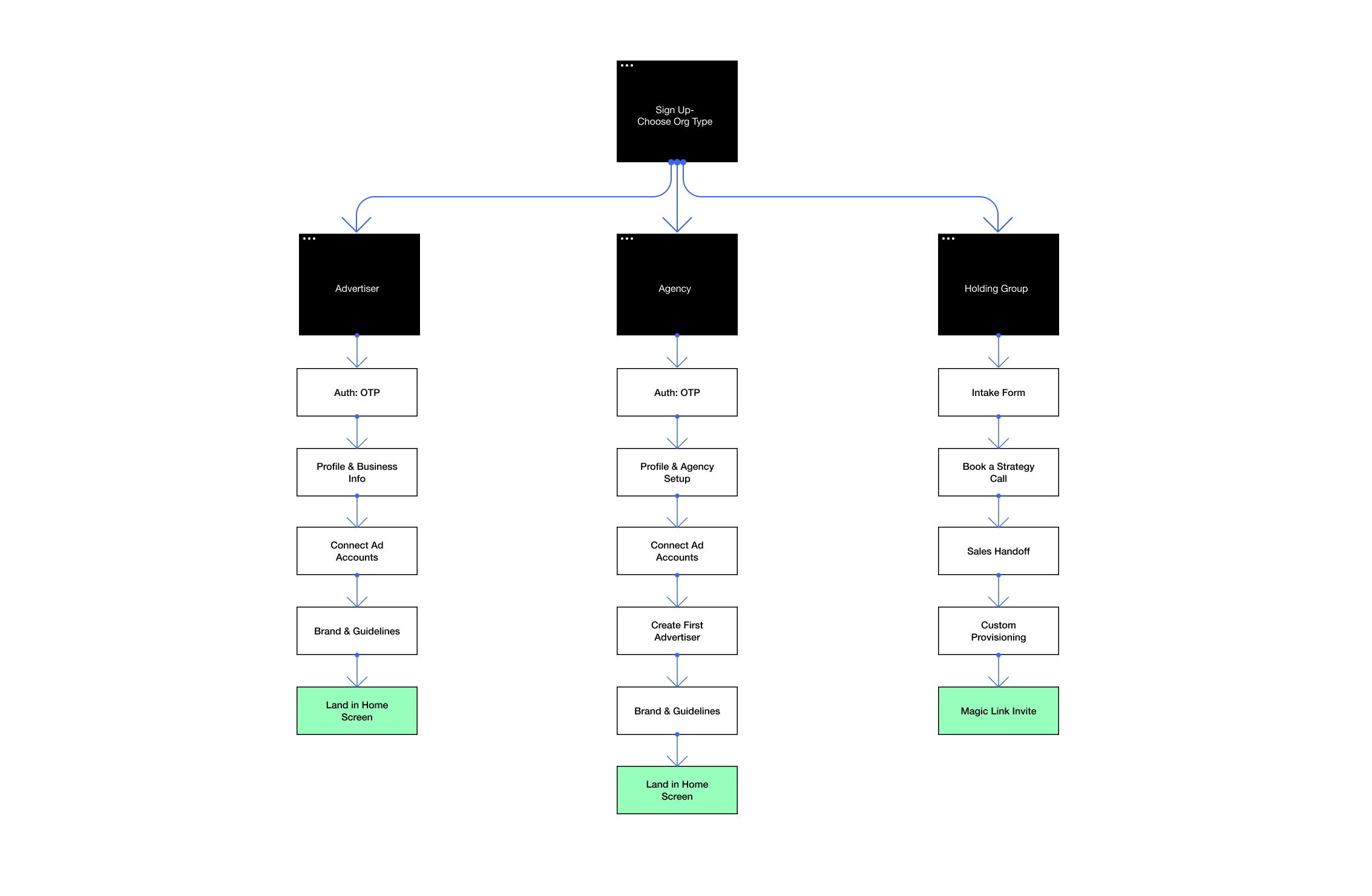
Sitemap Diagram

Sitemap Diagram

Key Design Decisions

Key Design Decisions

  1. Name first, then org type. Nothing else. Step 1 asks for a name, then asks: Advertiser or Agency? No other setup happens before this.

  1. Name first, then org type. Nothing else. Step 1 asks for a name, then asks: Advertiser or Agency? No other setup happens before this.

why

Everything else depends on this answer. Asking it first means no step gets wasted on the wrong flow.

  1. Hierarchy comes before platforms. Step 2 collects the Agency name and first Advertiser name, before any platform gets connected.

  1. Hierarchy comes before platforms. Step 2 collects the Agency name and first Advertiser name, before any platform gets connected.

why

Platforms need something to attach to. Building the structure first means every connection maps correctly from the start.

  1. Platforms connect on one screen. Step 3 shows 8 platforms as toggles. The user flips on whichever apply, no separate step per platform.

  1. Platforms connect on one screen. Step 3 shows 8 platforms as toggles. The user flips on whichever apply, no separate step per platform.

why

The AI can't plan for a platform it isn't connected to. Doing this early means real data exists before setup even finishes.

  1. Brand setup comes last. Step 4 pulls together everything before it: brand name, connected platforms, time zone, currency, and a preview of which ad accounts are already linked.

  1. Brand setup comes last. Step 4 pulls together everything before it: brand name, connected platforms, time zone, currency, and a preview of which ad accounts are already linked.

why

The hard parts, hierarchy and platforms, are already done by now. This step just confirms and finishes.

Constraints

Constraints

  • Flow had to branch by org type at signup: no single form could cover all three account types

  • Enterprise accounts need manual setup after a sales call: no self-serve path exists for Holding Groups

  • Seat limits shape the UI: Growth plan is capped at 1 seat, so team settings fully hide, not just gray out

  • Scoped permissions: An Agency Analyst only gets admin rights for their assigned advertisers, not the whole agency

  • Manual handoff for enterprise: Holding Group setup depends on a real person after the sales call, so the product hands off to "here's your deck," then picks up later by invite link

  • Flow had to branch by org type at signup: no single form could cover all three account types

  • Enterprise accounts need manual setup after a sales call: no self-serve path exists for Holding Groups

  • Seat limits shape the UI: Growth plan is capped at 1 seat, so team settings fully hide, not just gray out

  • Scoped permissions: An Agency Analyst only gets admin rights for their assigned advertisers, not the whole agency

  • Manual handoff for enterprise: Holding Group setup depends on a real person after the sales call, so the product hands off to "here's your deck," then picks up later by invite link

Outcomes

Outcomes

4 enterprise clients onboarded in the first month.

4 enterprise clients onboarded in the first month.

Each one connected SSO, ad platforms, and brand data before reaching the chat, so every AI conversation started with real context, not a blank slate. There's no before/after comparison against the old flow to point to. But all 10 clients got through setup clean, without the "AI doesn't know my accounts" problem that used to surface early on.

What I Learnt

What I Learnt

Onboarding isn't one flow, it's deciding how many flows you need. Getting that split right mattered more than polishing any single screen.

Create a free website with Framer, the website builder loved by startups, designers and agencies.